HELPERG Ecosystem
Build Design HubBuild Design Hub

Ideas Library · Home Office

Glare-Free Screen Lighting Plan

A lighting-led idea about positioning daylight and lamps around screens, suited to owners with eye fatigue or glare who want a comfortable visual environment.

Spaces:Home office roomDesk by a windowScreen-based work alcove
Style:Layered-lightingVision-comfortAdaptive

See the idea

A desk in the living room, lit from the side

The question

I work at a desk in the living room. Where does it go so the screen is not washed out?

A work corner carved out of a living room, with the desk at right angles to the window so daylight falls across it rather than onto the screen.

A corner of a living room with a timber desk against the wall beside a large window, a dark chair, a laptop, a table lamp, open shelves above and a plant, with daylight falling across the desk from the side.3D illustration · not a photograph
Side light: daylight across the desk, not on the screen or in your eyes.

Desk at right angles to the window

The desk sits against the wall next to the window, so the window is to one side of the person working.

Works well when

  • There is a stretch of wall beside a window that is not a route.
  • You can add a lamp for dark afternoons.

Poor fit when

  • The only free wall faces the window or has it directly behind you.
  • Video calls need a quiet, closable space rather than a corner.

Main trade-off

Comfortable daylight for screen work without a separate room, but the living room now has a work corner in view.

Verify before choosing

  • Where the sun comes in at the times you work.
  • A socket within reach of the desk without trailing flexes.
What does not work, and why

Measurable problems, not matters of taste — each with the reason it fails and a way round it.

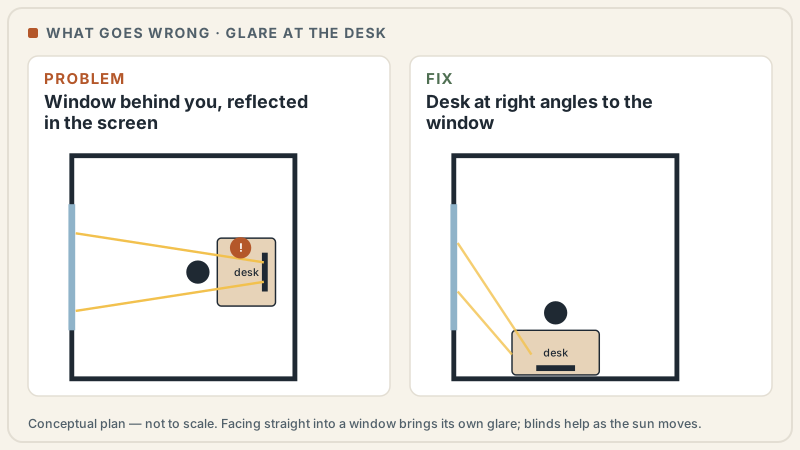
Two plan diagrams of a desk and window. On the left, the window is behind the person, and its reflection lands on the screen. On the right, the desk turns so the window is to one side and light falls across the desk.
Plan: a window behind the screen user reflects in the screen; side light does not. Conceptual editorial diagram — not to scale, not a construction drawing and not a real home. Clearances, fittings and finishes depend on the room, the products and local rules, and are confirmed with qualified professionals.

Glare on a screen

What happens
A window sits behind the person at a screen, or a gloss surface reflects a bright light into their view.
Why it matters
A bright patch lands over what they are reading, and eyes tire from adjusting between the screen and the window.
The fix
Turn the desk so the window is to one side, use blinds as the sun moves, and keep surfaces near the screen matt.
Not a mistake when
A gloss ceiling or a mirror is a deliberate choice in a room where nobody reads a screen facing it.

These images are 3D illustrations made by Build Design Hub: the rooms are modelled and lit in software, then rendered. They are not photographs, not AI-generated, and not records of any real home or project. How the images are made.

Where this idea works

Where this idea works

Contexts this direction tends to suit — and, honestly, where it may not.

  • People experiencing eye strain or glare at their screen
  • Owners working long hours across changing daylight
  • Rooms with bright windows that wash out displays
  • Anyone planning lighting before fixing the desk position
  • Owners who take video calls and want even, flattering face light

Where it may not fit

Where it may not fit

  • Spaces where window position cannot be worked around at all
  • Owners unwilling to adjust either the desk or the window treatments
  • Rooms where a single ceiling fitting is the only permitted light source

Planning

Planning considerations

  • Aim for daylight to arrive from the side of the screen rather than directly behind or in front of it
  • Layer ambient, task and screen lighting rather than relying on one bright overhead source
  • Plan adjustable shading so bright daylight can be tempered through the day
  • Keep the area behind the screen lit softly to reduce the contrast the eye must handle
  • Indirect or bounced ambient light reduces the contrast between a bright screen and a dark room
  • For video calls, soft light toward the face reads better than a source directly overhead or behind

Layout

Layout considerations

  • Position the desk so windows sit to the side, avoiding glare on the screen and silhouetting behind it
  • Place task lighting to illuminate documents without spilling onto the display
  • Choose matte wall and desk finishes near the screen to cut reflected hotspots
  • Allow dimming so light can match the time of day and reduce late-session fatigue
  • Place task light to the side of the working hand to avoid casting a writing shadow
  • Fixtures behind or above the monitor can reflect into it and are often better relocated

Materials & finishes

Materials and finishes to discuss

Named generically as starting points to discuss with professionals — not specifications, and not priced.

Consider:Adjustable task lampsDiffusing window shadesMatte wall finishesWarm-to-neutral dimmable sourcesAnti-glare screen positioningOpal glass diffusersIndirect uplight fixtures
  • Adjustable lamp arms and shade mechanisms wear with frequent use and favour robust hardware
  • Window treatments in strong sun fade and degrade over time
  • Confirm task and ambient sources dim without flicker, which is fatiguing during long sessions

Maintenance & durability

Maintenance and durability questions

  • Lamp shades and diffusers gather dust that dims output and need cleaning
  • Blinds and shades need periodic cleaning and mechanism checks

Professional review

What to ask a qualified professional

Bring these questions to a designer, contractor or the relevant qualified professional or authority.

  • Can a lighting designer assess my glare sources and suggest a layered scheme?
  • How should the desk sit relative to my windows to balance daylight and screen comfort?
  • Which dimmable, adjustable fittings suit my room's existing wiring and switching?
  • Are the window treatments I am considering compatible with my window type and orientation?
  • What light position would flatter my face for video calls without glare?
  • Do the task and ambient sources dim without flicker for long working sessions?

More ideas

Related ideas

Focus Desk Orientation →An educational look at orienting a single-focus desk within a dedicated room, weighing sightlines, door position and window glare for sustained deep work.Dual-Monitor Zone →An educational guide to planning a two-screen workstation, focusing on desk depth, monitor spacing and neck-neutral viewing angles for long working sessions.Sit-Stand Zone →An educational idea for a height-adjustable standing-desk zone, weighing floor clearance, underfoot comfort and cable slack that allows the surface to travel.Video-Call Backdrop →An educational idea for composing what sits behind you on camera, weighing wall finish, depth, lighting and tidiness for an uncluttered call presence.Acoustic Comfort →An educational idea on softening a workspace acoustically, weighing absorption, echo control and reduced sound transfer for clearer calls and easier focus.Shared Desks for Two →An educational look at a two-person office where desks sit back to back, balancing shared space, visual separation and managing two sets of calls at once.Layered Neutrals →A tonal direction building depth from many closely related neutrals and textures, where matching undertones and lighting temperature keep it rich, not muddy.Natural-Light-Led →How to plan a living room around daylight and orientation, using finishes and window treatments to make the most of natural light and manage glare.Tunable-White Lighting →A lighting direction using tunable-white sources that shift from cooler daytime light to warmer evening light across a room or home.Focus Home-Office Palette →A restrained home-office colour direction aimed at supporting concentration, managing screen glare and keeping video-call backdrops clean and uncluttered.

Related guides

Related Build Design Hub guides

Home Office Ideas

Home office and workspace ideas for planning — focus-friendly layouts, lighting, storage and acoustics questions to explore.

Browse all Home Office ideas →