
Who this guide is for
- Owners and clubs scoping a football-field or training-ground project who want an organized way to track uncertainties
- Academies and schools planning a pitch and needing a shared record for governors, trustees or leadership
- Municipalities and parks departments preparing public-facility briefs and stakeholder discussions
- Developers and project sponsors who need a register to brief consultants and structure due diligence
- Facility managers preparing operations, maintenance and seasonal-use planning conversations
- Boards, finance committees and grant bodies who want visibility into how project risks are being tracked
Planning diagram
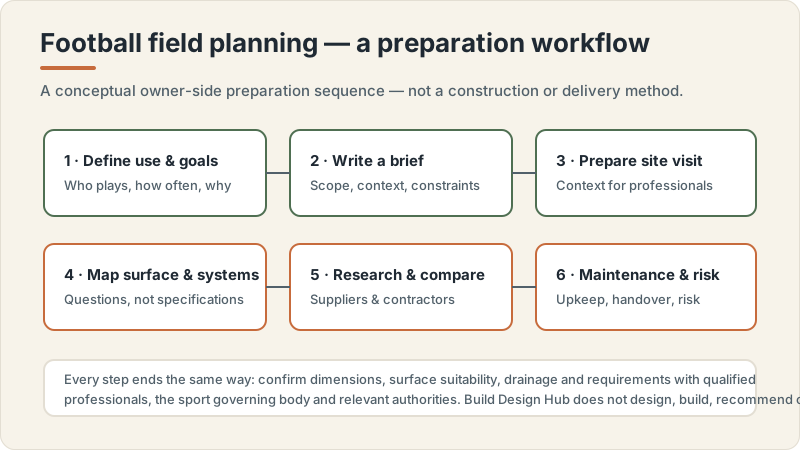
Football field planning workflow concept
Conceptual editorial diagram — not a construction drawing, specification, to-scale plan or proof of a real project. It is not engineering, structural, fire/life-safety, crowd-safety or accessibility-compliance guidance. Capacities, dimensions, standards, requirements and costs vary by facility type, audience, site, use case and governing body, and are confirmed with qualified professionals, relevant authorities and governing bodies. Build Design Hub does not design, build, inspect, certify, recommend or match anyone.
What this guide helps you prepare
This guide helps you create and maintain your own risk register: a structured list where each row is a single risk, described in plain language, with columns that help you think about it and discuss it. The aim is preparation. A good register turns a vague worry such as 'the ground might be a problem' into a logged item you can raise with the right professional, assign an owner to, and revisit on a schedule. It supports briefs, stakeholder discussions, supplier and contractor research, and quote-comparison structures by making your open questions explicit rather than buried in conversation.
What the guide deliberately does not do is decide anything for you. It does not rate whether a risk is acceptable, recommend a mitigation, set thresholds, or tell you what 'high' or 'low' should mean for your project. Likelihood-and-impact thinking here is a way to organize discussion, not a scoring system that produces a verdict. Every substantive judgment, including whether a risk is tolerable and what to do about it, is a matter for qualified professionals, relevant authorities and the applicable governing bodies. Treat the register as scaffolding for those conversations.
- A consistent place to capture each risk as a single, plainly worded row you can discuss
- A likelihood-by-impact way of thinking that organizes conversation rather than producing a verdict
- Owner, mitigation-idea and review columns so nothing important is left unassigned or unrevisited
- A living document you can update as briefs, site information and professional input evolve
- A clearer set of questions to bring to consultants, authorities and governing bodies
- A shared reference that helps boards, committees and stakeholders see what is being tracked
Categories of risk an owner can log
Most owners find it easier to start a register by working through categories rather than staring at a blank page. Useful categories for a football-field or training-ground project often include site and ground-condition unknowns, planning and approvals, surface-system and maintenance assumptions, environmental and drainage uncertainty, access and neighbour considerations, programming and shared-use conflicts, procurement and contractor questions, schedule and seasonal-timing dependencies, budgeting and funding uncertainty, governance and decision-making, and operations and stewardship after handover. You are logging the existence of an open question in each area, not answering it.
For each category, the goal is to capture what you do not yet know and who could help you find out, never to assert a requirement or specification. Resist the urge to write 'we need X gradient' or 'turf must last Y years' in your register; those are questions to confirm, not facts to record. Instead phrase items as uncertainties and decisions outstanding. Requirements vary by location, use case, governing body, owner, site, surface system, maintenance plan, climate, authority and professional team; confirm with qualified professionals. A category-driven pass helps you notice the areas you have not thought about at all, which is often where the most important risks hide.
- Site and ground-condition unknowns: what is not yet understood about the land or existing surfaces
- Approvals and governing-body alignment: which permissions and bodies need to be confirmed, and by whom
- Surface-system and maintenance assumptions: what choices remain open and who can advise on them
- Environmental, water and neighbour considerations: what studies or conversations may be needed
- Programming and shared-use conflicts: who else uses the space and how scheduling could clash
- Procurement, funding, schedule and governance: where decisions, money or timing are still uncertain
Columns to structure your register
A practical register has more than a list of risks; it has columns that make each row useful. Common columns an owner can maintain include a short risk description, the category, a likelihood note, an impact note, an owner (the named person responsible for tracking it), mitigation ideas to discuss with professionals, a status, and a review date. The likelihood and impact notes are best kept qualitative and clearly framed as your current working view, not a calculated score. Their purpose is to help you sort conversations and decide what to raise first, not to certify that something is safe or acceptable.
The owner column is often the most valuable and the most neglected. Assigning a single named person to each risk prevents items from drifting unowned, and it clarifies who will carry the question into the next professional conversation. The mitigation column should hold ideas and questions to explore with qualified professionals, explicitly framed as 'to confirm' rather than decided actions, since you are not making safety-engineering or risk-acceptance decisions yourself. A review-date column keeps the register alive: a risk that looked minor at brief stage may change as site information arrives, so scheduling revisits matters more than getting the first entry perfect.
- Risk description: one plainly worded sentence per row, no jargon, no asserted requirements
- Category and a qualitative likelihood and impact note framed as your current working view
- Owner: a single named person responsible for tracking and escalating that risk
- Mitigation ideas: questions and options to discuss with qualified professionals, marked 'to confirm'
- Status and review date so the register stays current as the project evolves
- Source or related question: who raised it and which professional or authority could help resolve it
Planning questions before speaking with professionals
Before you sit down with consultants, contractors or authorities, it is worth using the register itself to sharpen your own thinking. Working through your draft rows helps you notice which risks you can describe clearly and which are still too vague to discuss. It also helps you separate questions you can research yourself, such as who the relevant governing bodies are, from questions only a qualified professional can answer, such as anything touching ground conditions, surface systems, drainage or safety. Preparing this way makes professional time more productive and helps you compare advice consistently.
These questions are about readiness, not answers. The point is to arrive at professional conversations with an organized register, clear owners, and a prioritized list of uncertainties, rather than expecting this guide to resolve them. Keep framing everything as open until confirmed; do not let a confident-sounding draft entry harden into an assumed fact. Requirements vary by location, use case, governing body, owner, site, surface system, maintenance plan, climate, authority and professional team; confirm with qualified professionals.
- Which risks can I describe in one clear sentence, and which are still too vague to discuss?
- Which categories have no entries yet, suggesting an area I have not thought about?
- Who is the named owner for each risk, and is anyone overloaded or missing?
- Which items are questions I can research myself versus questions only a professional can answer?
- Which governing bodies, authorities or stakeholders should I identify before the first meeting?
- How will I record professional input against each row without turning it into an asserted fact?
Questions for qualified professionals
When you do engage qualified professionals, your register becomes the agenda. Rather than asking open-ended 'is this fine?' questions, you can walk through specific logged risks and ask what each professional would need to assess them, what they consider out of scope, and which other specialists or authorities should be involved. This keeps you in the role of an informed owner organizing the work, while the professionals make the substantive judgments about feasibility, safety, suitability and acceptability that are properly theirs to make.
Frame your questions to surface what you do not know rather than to extract a quick yes or no. Ask how a professional would prioritize the risks you have logged, what additional risks they would add that you missed, and what evidence or studies they would expect before any judgment could be made. Never ask this guide, or treat any draft register entry, as a stand-in for that expertise. Requirements vary by location, use case, governing body, owner, site, surface system, maintenance plan, climate, authority and professional team; confirm with qualified professionals.
- Which of my logged risks fall within your scope, and which need other specialists or authorities?
- What additional risks would you add that I have not captured in my register?
- How would you prioritize these risks, and what evidence would you need before judging any of them?
- Which risks depend on site investigation or studies that have not yet been carried out?
- Which governing bodies or authorities must confirm aspects of this project, and at what stage?
- What should I record against each risk so my register reflects your input accurately and stays current?
What this does not replace
This is an educational project-preparation resource only. It is not a construction manual and not engineering, architectural, turf-installation, drainage-engineering, sports-surface-specification, structural, fire or life-safety, crowd-safety, accessibility-compliance, permit, zoning, legal, tax or procurement advice. It does not design, specify, install, certify, inspect or approve anything, and it is not an estimate, quote, price, capacity recommendation or performance or lifespan guarantee. Requirements, standards, dimensions, surface systems and costs vary by location, use case, governing body, owner, site, climate, maintenance plan, authority and professional team, and are confirmed with qualified professionals, relevant authorities and the sport governing body.
Build Design Hub does not design, build, install, engineer, inspect, certify, recommend, rank, verify, introduce, broker or match suppliers or contractors, and HELPERG LLC is publisher/operator only. Use this resource to prepare your own thinking, then have qualified professionals you engage directly review your project. Decisions about engineering, surface specification, drainage, safety, compliance, procurement and suitability must rest on those professionals, the relevant authorities and the governing body for your sport and location.
- Not a construction manual and not engineering, turf-installation or drainage-engineering instructions
- Not sports-surface specification, structural, fire/life-safety, crowd-safety or accessibility-compliance advice
- Not permit, zoning, legal, tax or procurement advice
- Not a supplier or contractor recommendation, ranking, directory or matching service
- Not an estimate, price, capacity recommendation or performance/lifespan guarantee — requirements and costs vary
- Qualified professional review is required before any project decision
Football field risk-register preparation worksheet
- 1Record a one-line plain-language description for each risk you can currently name
- 2Tag each risk with a category (site, approvals, surface and maintenance, environmental, programming, procurement, schedule, funding, governance, operations)
- 3Add a qualitative likelihood note for each risk, framed as your current working view, not a score
- 4Add a qualitative impact note for each risk, kept descriptive rather than calculated
- 5Assign a single named owner to every risk so none drift unowned
- 6Capture mitigation ideas as questions to confirm with qualified professionals, never as decided actions
- 7Note which authority, governing body or professional could help resolve each risk
- 8Set a review date for each risk and a cadence for revisiting the whole register
- 9List categories that currently have no entries, as prompts for areas you may have overlooked
- 10Gather any site, brief or stakeholder information you already hold that informs each risk
- 11Record who raised each risk and any related open question it connects to
- 12Note which risks block decisions or depend on studies not yet carried out
- 13Prepare a prioritized shortlist of risks to raise in the next professional conversation
- 14Keep a version note or date stamp so the register is recognizably a living document
Common mistakes to avoid
- Writing requirements, dimensions, specifications or lifespans into the register as if they were facts instead of questions to confirm
- Using likelihood-by-impact scoring to declare a risk 'acceptable' or 'safe', which is a professional and authority judgment, not an owner's
- Leaving risks unowned, so items are tracked by everyone and therefore by no one
- Treating the register as a one-time document rather than a living record with review dates
- Only logging risks you already understand, while ignoring categories you have not thought about
- Confusing mitigation ideas with decided actions, and skipping the step of confirming them with professionals
- Letting confident-sounding draft entries harden into assumptions that no one revisits
- Expecting the register, or this guide, to resolve risks rather than to organize them for expert conversations
When to involve a professional
- When any logged risk touches ground conditions, site investigation, surface systems, drainage or water, all of which need qualified assessment
- When you need to know which approvals, permissions or governing-body confirmations apply and at what stage
- When deciding whether a risk is tolerable or how to mitigate a hazard, which are risk-acceptance and safety judgments for professionals and authorities
- When the register reveals gaps that suggest specialists you have not yet engaged are needed
- When stakeholders, boards or funders need an evidence-based view of feasibility rather than a draft owner's view
- When procurement, contracts or shared-use arrangements raise questions that need legal, technical or governing-body input
Frequently asked questions
Questions readers ask about this topic
Does Build Design Hub recommend, rank or match suppliers or contractors for my football field?
No. Build Design Hub is an educational planning resource and does not recommend, rank, verify, introduce, broker or match suppliers or contractors, and does not provide costs, prices, requirements, turf specifications or performance figures. This guide only helps you structure your own risk register so you can have clearer conversations. Any selection, specification or assessment is for you and your qualified professionals, with confirmation from relevant authorities and governing bodies.
Will a risk register tell me whether my project is safe or whether a risk is acceptable?
No. A register is a thinking and communication tool. It helps you organize uncertainties, assign owners and prepare questions, but it does not make safety-engineering or risk-acceptance decisions. Whether a risk is tolerable, and what to do about it, is a judgment for qualified professionals and the relevant authorities. Requirements vary by location, use case, governing body, owner, site, surface system, maintenance plan, climate, authority and professional team; confirm with qualified professionals.
How detailed should likelihood and impact notes be?
Keep them qualitative and clearly framed as your current working view, not a calculated score that produces a verdict. Their purpose is to help you sort conversations and decide what to raise first, not to certify anything. Professionals and authorities can help you refine how you think about likelihood and impact once they assess the substantive details, so leave room for their input rather than locking in a number.
Who should own each risk in the register?
Ideally a single named person per risk, so every item has someone responsible for tracking it and carrying it into the next conversation. The owner is not the person who resolves the risk through engineering or design; they coordinate the question and escalate it to the right professional or authority. Unowned risks are the ones most likely to be forgotten, so assigning ownership is one of the most valuable things the register does.
Keep reading