
Who this guide is for
- Owners and clients funding an indoor sports hall, gym or multi-purpose training space who want their own view of project risk.
- Clubs and community organizations preparing a project brief and stakeholder discussions for an indoor facility.
- Schools and academic institutions planning a sports hall who need to structure uncertainties before engaging professionals.
- Municipalities and public bodies who must document and review project risk alongside a professional team.
- Developers and project teams assembling procurement documents and quote-comparison structures.
- Facility managers preparing to inherit an indoor space and wanting operational and handover risks logged early.
Planning diagram
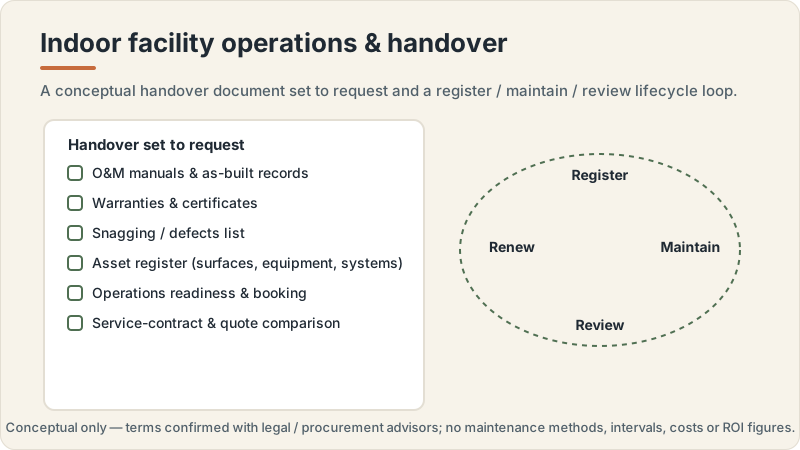
Indoor facility operations and handover concept
Conceptual editorial diagram — not a construction drawing, specification, to-scale plan or proof of a real project. It is not engineering, structural, fire/life-safety, crowd-safety or accessibility-compliance guidance. Capacities, dimensions, standards, requirements and costs vary by facility type, audience, site, use case and governing body, and are confirmed with qualified professionals, relevant authorities and governing bodies. Build Design Hub does not design, build, inspect, certify, recommend or match anyone.
What this guide helps you prepare
This guide helps you set up an owner's risk register: a structured list of the things that could affect your indoor sports facility project, kept in your own words and under your own control. It walks through a likelihood-by-impact way of thinking about entries, the categories of risk you might log, and the columns that keep each entry useful over time. The aim is preparation, not analysis. You leave with a framework you can populate with your project team and revisit at agreed points, and with sharper questions for the qualified professionals, authorities and governing bodies who make the technical and compliance judgments.
It deliberately stops short of telling you how likely anything is, how bad any outcome would be, or which risks you should accept. Those are decisions for you together with qualified professionals, and the register is simply where you record them. It also does not replace a professional risk assessment, a safety case, a design review or any compliance process. Think of the owner's register as the layer that sits above the technical work: it tracks who owns each concern, what is being done about it, and when it was last reviewed, so nothing quietly falls off the table as the project moves forward.
- Understand what an owner's risk register is and how it differs from an engineering or safety risk assessment.
- See how a likelihood-by-impact grid can help you sort entries without stating fixed probabilities as facts.
- Identify categories of risk worth logging for an indoor sports hall, gym or training space.
- Learn the columns that keep each entry actionable: owner, mitigation being considered, status and review date.
- Prepare focused questions for qualified professionals, authorities and governing bodies rather than assuming answers.
- Set a review rhythm so the register stays current across brief, design, procurement, construction and handover.
A likelihood-by-impact way of thinking about entries
Many owners find it helpful to think about each risk along two loose dimensions: how likely it feels that the issue arises, and how much it would affect the project if it did. Plotting entries on a simple grid, from lower to higher on each axis, helps you see which items deserve early attention and which can simply be watched. The important caution is that these are your working impressions for prioritization, not measured probabilities or quantified severities. This guide does not supply likelihood values, impact thresholds or scoring formulas, and you should not treat any placement as a fact. Where a professional judgment is needed, the grid should point you toward asking rather than deciding.
Use the grid to structure conversation, not to replace it. A useful register keeps the reasoning visible: why an item feels more or less likely, what a serious impact would look like in plain terms, and what would change the picture. Because likelihood and impact vary by location, facility type, use case, governing body, owner, site, authority, professional team and project scope, you should confirm anything consequential with qualified professionals. The grid's job is to help you and your team agree on where to focus attention and which items to raise first with the people qualified to assess them properly.
- Sketch a two-axis grid (likelihood and impact) and place each entry as a working impression, not a measured value.
- Record your reasoning for each placement so the register explains itself to your project team later.
- Flag any entry whose likelihood or impact you cannot judge as one to confirm with a qualified professional.
- Avoid assigning numeric scores or probabilities you cannot support; keep placements qualitative and reviewable.
- Re-plot entries after each project stage, since new information can move an item on the grid.
- Use the grid to decide the order of conversations, not to decide which risks are acceptable.
Categories of risk to log and the columns that keep them useful
Owners often find it easier to populate a register when they work through categories rather than staring at a blank page. For an indoor sports facility, useful groupings might include site and existing-building unknowns, scope and brief clarity, stakeholder and governing-body alignment, procurement and supplier research, programme and sequencing dependencies handled by others, building-systems questions to route to professionals, operational and handover readiness, and lifecycle and maintenance responsibilities. The point of categories is completeness of thinking, not authority: none of these headings tells you a requirement, and each should prompt a question to the relevant professional or authority rather than an assumed answer about capacities, dimensions, systems or compliance.
The columns matter as much as the categories. A workable owner's register usually names an owner for each entry (the person accountable for tracking it, not for resolving it single-handedly), a short note on the mitigation being considered, a status, a last-reviewed date, and a pointer to the professional or authority who will make the technical call. Keep mitigation notes at the level of actions and questions, not solutions you are unqualified to specify. Because what belongs to the owner versus the professional varies by project, resist recording a system decision, a compliance conclusion or a design choice as though it were yours to make; the register should show where those decisions have been routed.
- List candidate categories: site unknowns, scope clarity, stakeholders, procurement, programme dependencies, building-systems questions, operations, handover, lifecycle.
- For each entry, name an owner responsible for tracking it and a professional or authority who will assess it.
- Keep the mitigation column to actions and questions, not to system, sizing or compliance solutions.
- Add status and last-reviewed columns so stale entries are visible at a glance.
- Distinguish owner-level concerns from professional judgments, and mark which is which.
- Cross-reference each building-systems entry to the documentation you will request rather than a specification you assume.
Planning questions before speaking with professionals
Before you sit down with a project team, it helps to organize your own thinking so the register reflects your priorities rather than the first template you found. Work through what a good outcome looks like for your indoor facility, who the stakeholders are, what is genuinely unknown about the site or existing building, and where you are relying on others whose timelines you do not control. Writing these down as draft entries, even rough ones, means your first professional conversations start from your real concerns. It also surfaces the assumptions you are carrying, which is exactly what you want to question rather than bake into the register as fact.
These questions are for structuring your preparation, not for reaching technical conclusions. Anything that touches requirements, capacities, dimensions, systems, compliance or timelines should be logged as something to confirm with qualified professionals, relevant authorities and your governing body. The goal is a register that is honest about what you know, clear about what you do not, and explicit about what you have handed to others. That honesty is what makes the document useful when you review it later and when you compare quotes or scope with suppliers you have researched independently.
- What does a successful outcome look like for this indoor facility, in plain terms, from your point of view?
- Which stakeholders and governing bodies need to be aligned, and where might their expectations differ?
- What is genuinely unknown about the site, the existing building or the intended use pattern?
- Which parts of the programme depend on others whose timelines you cannot control?
- What assumptions are you currently making that should be questioned rather than logged as fact?
- How often will you review the register, and who will keep it current between reviews?
Questions for qualified professionals
Once your draft register exists, the qualified professionals on your project can help you test it. Rather than asking them to confirm figures you have guessed, use the register to ask what you may have missed, which entries they would frame differently, and which items belong to them to assess rather than to you to decide. For building-systems entries, keep your questions at the level of what to ask and what documentation to request, and let the professional supply the technical judgment, the applicable requirements and any compliance conclusions. This keeps the boundary clear: you own the register and its review rhythm; they own the assessments it points to.
Bring the register to relevant authorities and your governing body in the same spirit. Ask what they will need to see, what varies by your specific location, facility type and use case, and where your assumptions are unsafe. Record their answers as entries with a named professional or authority attached, and update the likelihood-by-impact placement only in light of what they tell you. Because requirements vary by location, facility type, use case, governing body, owner, site, authority, professional team and project scope, treat every professional answer as the authoritative input your register was built to capture, not as something to second-guess with a template.
- Which risks have I missed for a facility of this type, and which would you categorize differently?
- Which entries on my register are yours to assess rather than mine to decide?
- For each building-systems question, what documentation should I request and what will confirm it is resolved?
- What do the relevant authorities and my governing body need to see, and when in the project?
- Where are my current assumptions about scope, site or use unsafe to carry forward?
- How should the register's review points align with the project's design, procurement and handover stages?
What this does not replace
This is an educational planning resource only. It is not an indoor sports facility construction manual and not structural or architectural design, HVAC/ventilation, lighting or acoustic engineering, fire or life-safety, or accessibility-compliance advice, and it is not permit, zoning, inspection, certification, legal, tax, insurance or procurement advice. It does not design, build, engineer, specify, size, certify, inspect or approve anything, gives no capacities, dimensions, clearances, lux, air-change rates, acoustic or temperature thresholds, revenue, ROI or costs, and offers no warranty interpretation or estimate. Requirements, standards, capacities and costs vary by location, facility type, use case, governing body, owner, site, authority, professional team and project scope, and are confirmed with qualified professionals, relevant authorities and governing bodies.
Build Design Hub does not design, build, engineer, inspect, certify, recommend, rank, verify, introduce, broker or match suppliers, contractors, consultants or professionals, and HELPERG LLC is publisher/operator only. Use this resource to prepare your own thinking and briefs, then have the qualified professionals you engage directly — architects, structural and building-services engineers, lighting, acoustic, accessibility and fire/life-safety specialists, and legal or procurement advisors where appropriate — review your project. Decisions about design, engineering, systems, safety, accessibility, compliance, capacity, procurement and cost must rest on those professionals, the relevant authorities and the governing bodies for your sport and location.
- Not an indoor sports facility construction manual and not structural or architectural design
- Not HVAC/ventilation, lighting or acoustic engineering, fire/life-safety or accessibility-compliance advice
- Not permit/zoning, inspection, certification, warranty-interpretation, legal, tax, insurance or procurement advice
- Not a supplier, contractor, consultant or professional recommendation, ranking, directory or matching service
- Not an estimate and gives no capacity, dimension, system-performance, revenue, ROI or cost figures — requirements and costs vary
- Qualified professional review is required before any indoor sports facility project decision
Owner's risk register preparation worksheet
- 1Record your plain-language definition of a successful outcome for the indoor facility.
- 2List the stakeholders and governing bodies whose alignment the project depends on.
- 3Write down what is genuinely unknown about the site or existing building, as questions to confirm.
- 4Draft candidate risk categories (site, scope, stakeholders, procurement, programme, building-systems, operations, handover, lifecycle).
- 5Create a working entry for each concern you already have, however rough.
- 6For every entry, name an owner responsible for tracking it (not for resolving it alone).
- 7Add a mitigation-being-considered note limited to actions and questions, not solutions.
- 8Attach a professional or authority to each entry that requires technical or compliance judgment.
- 9Plot each entry on a likelihood-by-impact grid as a working impression, noting your reasoning.
- 10Mark any entry whose likelihood or impact you cannot judge as one to confirm with a professional.
- 11Add status and last-reviewed columns to every entry so stale items are visible.
- 12List the documentation you will request for each building-systems question.
- 13Note the review rhythm and who keeps the register current between reviews.
- 14Gather questions to bring to qualified professionals, authorities and your governing body.
Common mistakes to avoid
- Copying likelihood or impact numbers from a template and treating them as measured facts for your project.
- Recording a building-systems, sizing or compliance decision as the owner's when it belongs to a qualified professional.
- Assuming requirements, capacities, dimensions or timelines instead of logging them as items to confirm.
- Naming an owner for an entry but expecting that person to resolve technical risks single-handedly.
- Writing mitigation notes as engineered solutions rather than as actions and questions.
- Building the register once and never setting a review rhythm, so it goes stale by handover.
- Skipping professional and governing-body review because the grid made the project feel decided.
- Blurring owner-level concerns with professional judgments so it is unclear who assesses what.
When to involve a professional
- Involve a qualified professional whenever an entry touches building systems, structure, fire and life safety, or accessibility, so the assessment sits with someone qualified to make it.
- Bring in the relevant authority or governing body when an entry concerns permits, codes, zoning, certification or compliance, since these vary by location and cannot be assumed.
- Engage a professional to review your likelihood-by-impact placements before any item is treated as low priority.
- Consult a professional when you cannot judge whether an entry is yours to decide or theirs to assess.
- Seek professional input before finalizing procurement or quote-comparison scope that depends on unconfirmed requirements.
- Involve appropriate qualified advisors on legal, tax, insurance or contractual entries rather than resolving them within the register yourself.
Frequently asked questions
Questions readers ask about this topic
Does Build Design Hub build the register or assess the risks for me?
No. Build Design Hub is an educational resource. It does not design, build, engineer, inspect, certify, recommend, rank or match suppliers, contractors or professionals, and it does not design HVAC, lighting or acoustic systems. This guide gives no capacities, dimensions, costs or requirements. It only helps you structure your own owner's register so you can ask better questions of qualified professionals, authorities and your governing body, who make the actual assessments.
How do I decide how likely or how serious a risk is?
This guide does not supply likelihood values, impact thresholds or scoring formulas, and you should not treat any placement as a fact. Use the grid to record your working impressions and reasoning for prioritization, then confirm anything consequential with qualified professionals, since likelihood and impact vary by location, facility type, use case, governing body, owner, site, authority, professional team and project scope.
Which risks are acceptable to carry forward?
Deciding which risks are acceptable is not something this guide does, and it is not an owner-only call. Risk-acceptance judgments belong to you together with qualified professionals, relevant authorities and your governing body. The register simply records where each decision has been routed and when it was last reviewed.
Is this the same as a professional risk assessment or safety case?
No. An owner's risk register is a preparation tool that sits above the technical work. It does not replace a professional risk assessment, a safety case, a design review or any compliance process. Keep it for tracking ownership, mitigation actions and review dates, and route the technical and compliance judgments to the qualified professionals and authorities it points to.
Keep reading