
Who this guide is for
- Facility owners and operators who will run an indoor sports hall or gym after handover and want a structured way to record what they are taking on
- Clubs and community organisations preparing to manage a multi-purpose training space and needing an organised inventory for planning
- Schools and education estates teams responsible for sports halls who must hand assets between staff and contractors over time
- Municipalities and public bodies preparing operations and lifecycle documentation for a leisure or sports facility
- Developers and project teams assembling handover packs and wanting the asset register scoped before completion
- Facility managers who inherit a building and need to reconstruct or improve an existing asset register
Planning diagram
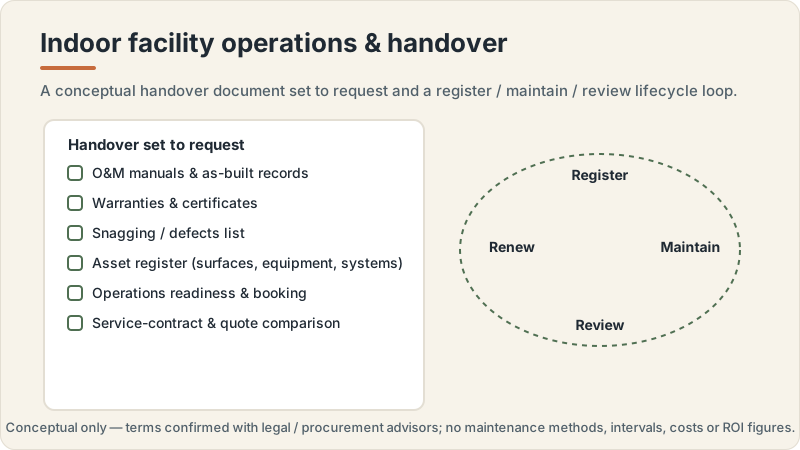
Indoor facility operations and handover concept
Conceptual editorial diagram — not a construction drawing, specification, to-scale plan or proof of a real project. It is not engineering, structural, fire/life-safety, crowd-safety or accessibility-compliance guidance. Capacities, dimensions, standards, requirements and costs vary by facility type, audience, site, use case and governing body, and are confirmed with qualified professionals, relevant authorities and governing bodies. Build Design Hub does not design, build, inspect, certify, recommend or match anyone.
What this guide helps you prepare
This guide helps you prepare the thinking and the brief behind an indoor sports facility asset register, before you commit to a particular format or tool. It walks through the kinds of assets an indoor facility typically contains, from playing surfaces and line markings to fixed and loose sports equipment, changing and support-room fittings, and the building systems that serve the space. The aim is to help you arrive at project meetings and handover discussions able to describe clearly what you want recorded and why, so that professionals, suppliers, and installers can respond to a defined scope rather than an open question.
It is preparation material, not a construction, design, or compliance document. It does not tell you how to build, convert, or fit out a hall, how to size or specify any system, or what any requirement, capacity, or interval should be. Where a decision touches structure, ventilation, lighting, acoustics, fire and life safety, accessibility, or any regulated matter, this guide points you toward the questions to ask and the documentation to request from the qualified professionals and authorities responsible, rather than offering an answer of its own.
- Clarify what an asset register is meant to do for your facility: operations support, handover continuity, and lifecycle planning
- List the broad asset categories your indoor facility may contain, without yet assigning conditions, values, or intervals
- Separate what the register records (facts about assets) from what professionals decide (specifications, requirements, timing)
- Identify which parties (suppliers, installers, professional team) hold the source information you will need to populate it
- Prepare a brief you can share so a register scope can be discussed against a defined expectation
- Note the questions and documentation requests to raise with qualified professionals rather than answering them yourself
What to record per asset: fields and categories
A useful register starts with agreeing what information you want to hold about each asset, consistently, so that entries are comparable and searchable later. For an indoor sports facility, assets typically fall into groups such as playing surfaces and line markings; fixed sports equipment; loose and portable equipment; changing, showering, and support-room fittings; and the building systems that serve the space, including lighting, ventilation, heating, and controls. Rather than deciding condition or lifespan now, the preparation task is to decide which descriptive fields make an entry genuinely useful, for example a clear asset name, location within the facility, category, and a reference to the supplier or manufacturer documentation that came with it.
The value of a register comes from consistency and traceability, not from opinions embedded in it. Where an asset was supplied with manuals, certificates, warranty paperwork, or installation records, the register can point to where those documents live rather than restating their content. Any question of capacity, rating, interval, or compliance status belongs with the documentation and the professionals who produced it. The register's job is to make sure nothing important is invisible and that whoever operates the facility can find the source of truth for each asset quickly.
- A consistent asset name and unique reference so items can be identified without ambiguity
- Location within the facility (hall, court, changing area, plant space, store) so assets can be found
- Category and sub-category (surface, fixed equipment, loose equipment, support-room fitting, building system)
- Links to source documentation: supplier or manufacturer manuals, installation records, certificates, warranty paperwork
- Responsible party or ownership note (who operates, maintains, or is accountable for the asset) as a placeholder to confirm
- A field for outstanding questions to raise with the relevant professional, rather than an assumed status
Organising the register and why structure matters for lifecycle
How a register is organised shapes how usable it is years later, when the people who built it may have moved on. A common approach is to structure entries by location and then by category, so that someone can navigate from a space to the assets within it, or filter across the whole facility by type of asset. Deciding this structure during preparation, rather than after data has been entered inconsistently, avoids a later rework. The preparation questions are about hierarchy and naming conventions: how granular an entry should be, how spaces are labelled, and how related assets (a surface and its line markings, or a system and its controls) are grouped or cross-referenced.
Structure matters for lifecycle because a register is the backbone of later operations, maintenance, and replacement conversations, even though this guide assigns no intervals or values to any asset. When a register is organised and traceable, questions such as which assets a professional should review, what documentation exists for a given system, and how handover information should be grouped become far easier to answer. The lifecycle judgements themselves, when something should be assessed, serviced, or replaced, remain with qualified professionals, manufacturers, and the parties responsible for the facility; a good structure simply makes it possible to ask those questions against organised information.
- Decide a naming and location convention before data entry so entries stay consistent and searchable
- Choose a hierarchy (by space, by system, by category) that matches how the facility is actually operated
- Define how related assets are cross-referenced, for example a surface with its markings or a system with its controls
- Consider how the register format supports handover: who receives it, in what form, and how it stays current
- Plan how outstanding questions and missing documentation are flagged so gaps are visible, not hidden
- Confirm with the project team how the register connects to any wider facility or estates records the owner keeps
Planning questions before speaking with professionals
Before you engage professionals, suppliers, or a facility management adviser, it helps to have worked through your own expectations so the conversation is efficient. These questions are internal: they clarify what you want the register to achieve, who will maintain it, and what you already hold. Working through them surfaces gaps, for example assets you know exist but for which you have no documentation, or spaces whose contents have never been formally listed. The stronger your own brief, the more useful the professional input you receive, because specialists can respond to a defined scope rather than reconstructing your intentions.
None of these questions ask you to decide a specification, requirement, or interval; those remain for the professionals and authorities responsible. They simply help you describe the register you want and the state of the information you already have. Keep any assumptions provisional and label them as things to confirm, so that when you do speak with a professional the boundary between what you know and what needs verifying is clear.
- What do we want this register to support: daily operations, handover, lifecycle planning, or all three?
- Who will own and update the register after handover, and in what format will they work?
- Which asset categories do we already have documentation for, and where are the gaps?
- How granular should entries be, and does that level of detail match how the facility is run?
- What existing records, drawings, or supplier packs can we gather before the professional conversation?
- Which items are we assuming rather than confirming, and how will we flag them for verification?
Questions for qualified professionals
When you speak with qualified professionals, suppliers, manufacturers, or a facility management adviser, the register brief becomes the anchor for a structured conversation. The right questions ask what information a professional expects to see recorded for a given asset or system, what documentation they can supply for the assets they are responsible for, and how they would expect the register to link to any inspection, servicing, or warranty records that sit outside it. This keeps the discussion focused on documentation and structure rather than drawing you into specification or compliance territory that belongs with the professional, the manufacturer, and the relevant authority.
For anything touching building systems, lighting, ventilation, heating, controls, or matters of accessibility, fire and life safety, or regulated performance, keep your questions at the level of what to record and what documentation to request. Ask the professional what they will provide and what they expect the register to reference; do not ask this guide, or the register itself, to hold judgements about ratings, intervals, capacities, or compliance. Requirements vary by location, facility type, use case, governing body, owner, site, authority, professional team, and project scope; confirm all specifics with the qualified professionals responsible.
- What information do you expect an asset register to hold for each asset or system you supply or install?
- What documentation (manuals, certificates, installation and commissioning records, warranty terms) will you provide for handover?
- How should the register reference inspection, servicing, or lifecycle records that you or others maintain separately?
- For building systems, what documentation should we request from you rather than record ourselves?
- Which assets should be reviewed or assessed by a professional, and who is the appropriate specialist for each?
- How should we keep the register accurate over time, and what would you expect the owner to update versus the professional?
What this does not replace
This is an educational planning resource only. It is not an indoor sports facility construction manual and not structural or architectural design, HVAC/ventilation, lighting or acoustic engineering, fire or life-safety, or accessibility-compliance advice, and it is not permit, zoning, inspection, certification, legal, tax, insurance or procurement advice. It does not design, build, engineer, specify, size, certify, inspect or approve anything, gives no capacities, dimensions, clearances, lux, air-change rates, acoustic or temperature thresholds, revenue, ROI or costs, and offers no warranty interpretation or estimate. Requirements, standards, capacities and costs vary by location, facility type, use case, governing body, owner, site, authority, professional team and project scope, and are confirmed with qualified professionals, relevant authorities and governing bodies.
Build Design Hub does not design, build, engineer, inspect, certify, recommend, rank, verify, introduce, broker or match suppliers, contractors, consultants or professionals, and HELPERG LLC is publisher/operator only. Use this resource to prepare your own thinking and briefs, then have the qualified professionals you engage directly — architects, structural and building-services engineers, lighting, acoustic, accessibility and fire/life-safety specialists, and legal or procurement advisors where appropriate — review your project. Decisions about design, engineering, systems, safety, accessibility, compliance, capacity, procurement and cost must rest on those professionals, the relevant authorities and the governing bodies for your sport and location.
- Not an indoor sports facility construction manual and not structural or architectural design
- Not HVAC/ventilation, lighting or acoustic engineering, fire/life-safety or accessibility-compliance advice
- Not permit/zoning, inspection, certification, warranty-interpretation, legal, tax, insurance or procurement advice
- Not a supplier, contractor, consultant or professional recommendation, ranking, directory or matching service
- Not an estimate and gives no capacity, dimension, system-performance, revenue, ROI or cost figures — requirements and costs vary
- Qualified professional review is required before any indoor sports facility project decision
Indoor facility asset register preparation worksheet
- 1Record the purpose you want the register to serve: operations, handover, lifecycle planning, or a combination
- 2List the spaces in the facility (hall, courts, changing rooms, stores, support and plant areas) as your location structure
- 3Note the broad asset categories present: surfaces and markings, fixed equipment, loose equipment, support-room fittings, building systems
- 4Draft a consistent naming and reference convention for entries before any data is entered
- 5Gather existing documentation you already hold: manuals, drawings, installation records, certificates, warranty paperwork
- 6Identify, for each category, which supplier, installer, or professional holds the source information you lack
- 7Decide the level of detail (granularity) for entries and confirm it matches how the facility is operated
- 8Record which fields each entry should carry: name, reference, location, category, documentation links, responsible party
- 9Flag assets or spaces for which documentation is missing so gaps are visible in the register
- 10List the assumptions you are making and mark each as an item to confirm with a professional or authority
- 11Prepare the documentation-request questions to raise with suppliers and installers at handover
- 12Note which assets and systems you intend to ask a qualified professional to review
- 13Confirm who will own and update the register after handover and in what format
- 14Assemble your notes into a brief you can share so a register scope can be discussed against a defined expectation
Common mistakes to avoid
- Stating a capacity, dimension, rating, or replacement interval in the register as if it were a fixed fact, rather than referencing the supplier documentation and professional confirmation
- Assuming a requirement applies to your facility without confirming it with the relevant governing body, authority, or qualified professional
- Treating decisions about building systems, such as ventilation or lighting, as owner choices to record, when specification belongs with the responsible professional
- Restating the content of warranties, certificates, or manuals inside the register instead of linking to the source documents
- Entering data before agreeing a naming, location, and hierarchy convention, leading to inconsistent and unsearchable records
- Skipping professional review of assets and systems and relying on the register alone to signal condition or compliance status
- Leaving no field to flag missing documentation or unconfirmed assumptions, so gaps become invisible over time
- Assuming lifecycle timing or valuation can be derived from the register itself rather than from professionals, manufacturers, and responsible parties
When to involve a professional
- When any asset or building system needs its condition, rating, or fitness assessed, involve the qualified professional or manufacturer responsible for it
- When questions touch ventilation, lighting, heating, acoustics, structure, fire and life safety, or accessibility, involve the relevant specialist rather than recording a judgement yourself
- When documentation is missing or ambiguous for an installed asset, ask the supplier, installer, or a professional to supply or clarify the source records
- When you need to understand inspection, servicing, certification, or warranty terms, involve the party who issued them rather than interpreting them in the register
- When lifecycle, replacement, or valuation questions arise, involve professionals, manufacturers, and the parties accountable for the facility
- When any requirement, capacity, or compliance status is uncertain, confirm it with qualified professionals, relevant authorities, and governing bodies before relying on it
Frequently asked questions
Questions readers ask about this topic
Does Build Design Hub design, build, inspect, or maintain the register for me, or design my facility's systems?
No. Build Design Hub is an educational resource. It does not design, build, engineer, inspect, certify, or maintain anything, and it does not design ventilation, lighting, acoustic, or other systems. It does not recommend, rank, verify, or match suppliers or contractors, and it provides no capacities, dimensions, intervals, values, or requirements. This guide only helps you prepare your own thinking and questions to take to qualified professionals.
Should the asset register include condition ratings, replacement dates, or values?
Those judgements are not for this framework to supply. Condition, lifecycle timing, and valuation depend on the specific assets, their use, and the professionals, manufacturers, and responsible parties involved. This guide covers how to structure a register and what to record so those questions can later be asked against organised information, not how to answer them.
How detailed should each asset entry be?
That depends on your facility, how it is operated, and who will maintain the register. This guide suggests deciding a consistent set of fields and a naming and location convention during preparation so entries stay comparable, but the appropriate level of detail is something to confirm with your project team and the professionals who supply and maintain the assets.
Can I use this register to confirm my facility meets requirements?
No. A register records information about assets; it does not establish compliance. Whether any requirement is met is a matter for qualified professionals, relevant authorities, and governing bodies. Requirements vary by location, facility type, use case, governing body, owner, site, authority, professional team, and project scope; confirm all specifics with the professionals responsible.
Keep reading