
Who this guide is for
- Facility owners assembling a single, trustworthy record of what they are responsible for before and after handover
- Club and association committees who need a register their volunteers and successors can read and maintain consistently
- Municipal or council facility leads documenting assets across multiple sites for governance and budgeting conversations
- School or campus facilities staff coordinating bursar, governor or estates-team oversight of facility assets
- Property developers preparing an asset list and data structure to hand to an eventual owner or operator
- Facility managers and operators turning a pile of handover documents into an organised, queryable register
Planning diagram
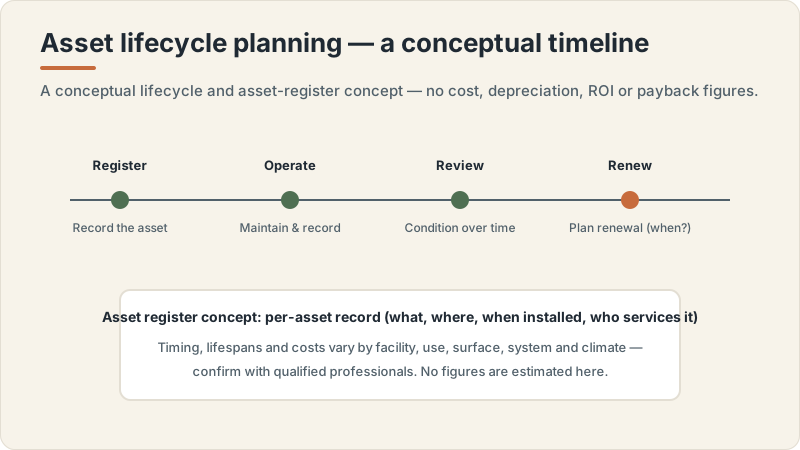
Asset lifecycle planning concept
Conceptual editorial diagram — not a construction drawing, specification, to-scale plan or proof of a real project. It is not engineering, structural, fire/life-safety, crowd-safety or accessibility-compliance guidance. Capacities, dimensions, standards, requirements and costs vary by facility type, audience, site, use case and governing body, and are confirmed with qualified professionals, relevant authorities and governing bodies. Build Design Hub does not design, build, inspect, certify, recommend or match anyone.
What this guide helps you prepare
This guide helps you decide the shape of your asset register before you start filling it, so the structure is deliberate rather than whatever the first handover document happened to imply. You will think through which things count as separate assets, what information you want to hold against each one, and how those records connect to the other documents you are building, such as a handover checklist, a warranty log or a risk register. Settling the framework first means the register stays consistent as it grows, and a successor can read it the way you intended rather than reverse-engineering your habits.
It also helps you treat the register as a planning artefact rather than a static inventory. A good register records not only what an asset is, but where it sits, who provided it, what documentation exists for it, and where the open questions are. This guide does not tell you how to maintain any asset, how often anything should be serviced, how long anything should last, or what anything should cost; those judgements belong to you and the qualified professionals, suppliers and contractors you engage. What it offers is a way to organise the facts so those conversations start from a clear picture.
- A working definition of what counts as a discrete asset for your facility, so the list is neither too coarse nor unmanageably fine
- A consistent set of fields recorded against every asset, so records are comparable and searchable
- A way to link each asset to its handover documents, warranty references and any related risk entries
- A method for marking unknowns and gaps as open questions rather than leaving fields silently blank
- A structure a successor, board or auditor can read without needing you to explain it
- A list of follow-up questions the register exposes for qualified professionals and suppliers
What to record per asset: building the field set
The value of a register comes from recording the same kinds of information against every asset, so think first about your fields rather than your entries. A workable starting set usually includes a unique identifier, a plain-language name, a category or asset type, a physical location, and a reference to the documentation that came with it at handover. Beyond those, owners often add fields for the supplier or contractor named in the handover record, any warranty or guarantee reference, the date the asset was recorded, and a notes field for context that does not fit elsewhere. The exact fields are yours to choose; the discipline is to define them once and apply them everywhere. Avoid recording maintenance intervals, expected lifespans or values as if they were settled facts, because those vary by facility type, use intensity, surface, system, climate, season, governing body, warranty terms, supplier documentation, contractor scope and local professional requirements, and must be confirmed with qualified professionals.
Decide deliberately how granular each asset entry should be, because granularity shapes everything downstream. A single sports surface might be one asset, or it might be sensible to record its sub-components separately if they have different documentation, different suppliers or different warranty references. There is no universal right answer, only a choice you make consistently and can explain. Where you are unsure whether something is one asset or several, record your reasoning in a notes field so a later reader understands the decision. Keep value, depreciation and cost figures out of this framework entirely; if your organisation tracks finances, that belongs in a separate exercise with your own advisers.
- A unique identifier for every asset, assigned in a consistent pattern you can explain
- A plain-language name plus a category or asset-type field for grouping and filtering
- A location field precise enough that someone unfamiliar with the site could find the asset
- A documentation reference linking the asset to its handover papers, manuals or warranty record
- A supplier or contractor field drawn only from the handover record, with no ranking or judgement implied
- A notes field for granularity decisions, open questions and context that does not fit a structured field
Organising the register and keeping it usable
A register is only as good as its organisation, so plan how entries are grouped, sorted and kept current before the list grows large. Many owners organise by category, by location, or by the system an asset belongs to, and a register that supports more than one of these views at once is more useful than one locked into a single ordering. Consistent identifiers, controlled category names and a stable field set are what make those views possible; without them, the same asset can appear under three different labels and the register stops being trustworthy. Decide who owns the register, how changes are recorded, and how a reader can tell when an entry was last touched, so the document stays a single source of truth rather than drifting into stale copies.
Think too about how the register connects to the rest of your planning. The same asset list can feed a handover checklist, anchor a warranty and defect log, populate a risk register, and frame a lifecycle or seasonal-review discussion, but only if identifiers are shared so an entry in one document points cleanly to the same asset in another. Plan for handover of the register itself: a future owner, operator or committee should be able to take it on without losing its logic. None of this requires you to specify how assets are maintained or operated; the register organises facts and references, and the maintenance and operating decisions sit with the qualified providers you engage.
- A primary organising principle (category, location or system) plus at least one alternate view
- A controlled list of category and location names so entries do not fragment under inconsistent labels
- Shared identifiers so an asset in the register maps cleanly to handover, warranty and risk documents
- A clear owner of the register and a simple record of who changed what and when
- A last-reviewed or last-updated marker so readers can judge how current an entry is
- A plan for handing the register itself to a successor without losing its structure or logic
Planning questions before speaking with professionals
Before you involve qualified professionals, suppliers or contractors, use the register to organise your own thinking so their time is spent confirming and interpreting rather than reconstructing your list. Walk through your asset entries and ask where information is missing, where you have guessed, and where a single entry might actually be several assets or several entries might be one. The blank fields and the notes you flagged as uncertain become your agenda. Preparing this way turns a vague conversation into a focused one anchored on specific gaps you have already identified.
It also helps to separate what you can resolve yourself from what genuinely needs expert input. Some gaps are just unread handover documents you can fill in by checking the pack; others are real questions about what an asset is, what documentation should exist for it, or which provider is responsible, that only a qualified professional, supplier or the relevant authority can clarify. Sorting your questions this way keeps the eventual conversation efficient and surfaces where suitability, requirements or responsibilities depend on factors specific to your facility type, surface, systems, climate, governing body and local professional requirements, which vary and must be confirmed with qualified professionals.
- Which assets am I unsure how to classify, and where have I recorded that reasoning?
- Which documentation references are missing, and can I fill them from the handover pack myself?
- Where might a single entry actually be several assets, or several entries one asset?
- Which fields are blank because the information is genuinely unknown rather than simply not yet entered?
- Which open questions can I answer by re-reading documents, and which need a professional or supplier?
- What about my facility type, surfaces, systems or governing body might change how an asset should be recorded?
Questions for qualified professionals
When you bring the register to qualified professionals, suppliers or contractors, present it as a structured set of questions rather than a request for a recommendation or a maintenance plan. Ask them to confirm whether your asset boundaries make sense, whether documentation you expect to exist for an asset is the right documentation, and whether any assets are missing from your list entirely. A professional or the original supplier can also help you understand which handover papers, warranty references or defect records should sit against a given asset, and which open questions in your notes are routine versus consequential for a facility like yours.
Keep your questions descriptive and open rather than asking anyone to rank suppliers, judge value, or specify maintenance for you. The register is most useful when it helps a professional explain what each asset is and what to confirm with relevant authorities, governing bodies, warranty providers and suppliers, not when it pressures them toward figures this guide deliberately does not provide. Record their answers back into the register or its notes, so it stays a living, evidence-based document that reflects expert input while leaving the operating, maintenance and compliance decisions clearly with you and the providers you engage. Requirements, intervals, lifespans, capacities and costs are theirs to define and confirm, not this guide's to state.
- Do my asset boundaries make sense, or should some entries be split or combined for a facility like this?
- What documentation, manuals or references should exist against each type of asset I have recorded?
- Are there assets, systems or sub-components missing from my list that I have not thought to capture?
- Which open questions in my notes are routine and which could carry consequences for my facility?
- How should warranty, defect and risk records connect to specific asset entries?
- What should I confirm directly with suppliers, relevant authorities or governing bodies before relying on an entry?
What this does not replace
This is an educational planning resource only. It is not a maintenance manual and not inspection, certification, engineering, architectural, structural, HVAC, electrical, safety-compliance, fire or life-safety, or accessibility-compliance advice, and it is not legal, tax, insurance or procurement advice. It does not maintain, operate, inspect, certify, audit or specify anything, gives no maintenance intervals or procedures as universal rules, and offers no warranty interpretation, estimate, price, ROI or capacity figure. Maintenance requirements and costs vary by facility type, use intensity, surface, system, climate, season, governing body, warranty terms, supplier documentation, contractor scope and local professional requirements, and are confirmed with qualified professionals, suppliers, contractors, relevant authorities and governing bodies.
Build Design Hub does not operate, maintain, inspect, certify, audit, design, build, recommend, rank, verify, introduce, broker or match suppliers, contractors, maintenance providers or facility managers, and HELPERG LLC is publisher/operator only. Use this resource to prepare your own thinking and records, then have qualified professionals you engage directly review your facility. Decisions about maintenance, inspection, safety, compliance, warranties, procurement and suitability must rest on those professionals, suppliers, the relevant authorities and the governing bodies for your sport and location.
- Not a maintenance manual and not maintenance instructions, intervals or procedures as universal rules
- Not inspection, certification, safety-compliance, fire/life-safety or accessibility-compliance advice
- Not engineering, architectural, warranty-interpretation, legal, tax, insurance or procurement advice
- Not a supplier, contractor, maintenance-provider or facility-manager recommendation, ranking, directory or matching service
- Not an estimate, price or cost figure — maintenance requirements and costs vary
- Qualified professional review is required before any operations or maintenance decision
Asset register planning worksheet
- 1Write a plain-language definition of what counts as a discrete asset for your facility
- 2Decide your standard field set and confirm every asset will carry the same fields
- 3Assign a consistent identifier pattern you can explain to a successor
- 4Choose a primary organising view (category, location or system) plus at least one alternate
- 5Create a controlled list of category and location names to prevent fragmented labels
- 6Add a documentation reference field linking each asset to its handover papers and manuals
- 7Add a supplier or contractor field drawn only from the handover record, with no judgement implied
- 8Add a warranty or guarantee reference field where one exists, as a reference only
- 9Use a notes field to record granularity decisions and any open questions per asset
- 10Mark missing information as an explicit open question rather than a silent blank
- 11Share identifiers so entries map cleanly to handover, warranty, defect and risk documents
- 12Name an owner of the register and a simple way to record who changed what and when
- 13Add a last-reviewed marker so readers can judge how current each entry is
- 14Keep a running list of questions the register exposed for qualified professionals and suppliers
Common mistakes to avoid
- Filling in entries before deciding the field set, so records end up inconsistent and hard to compare
- Recording maintenance intervals, lifespans or values as if they were facts rather than items to confirm with providers
- Letting category and location names drift, so the same asset appears under several different labels
- Leaving fields silently blank instead of marking them as explicit open questions
- Choosing a granularity for one asset and a different, unexplained granularity for another
- Building the register in isolation so its identifiers do not connect to handover, warranty or risk documents
- Assuming a warranty reference means an asset is covered, rather than treating it as something to confirm with the provider
- Treating the register as a finished inventory rather than a living document with an owner and an update history
When to involve a professional
- When you cannot tell whether something should be one asset or several for a facility like yours
- When you are unsure what documentation should exist against a given asset or system
- When warranty, defect or risk records need to be tied correctly to specific asset entries
- When handover documents are incomplete and you need to know what is missing before relying on the register
- When asset structure or coverage could carry consequences that depend on your surfaces, systems or governing body
- When stakeholders, auditors or a board need expert interpretation before the register is relied upon for decisions
Frequently asked questions
Questions readers ask about this topic
Does Build Design Hub maintain, inspect, certify or recommend providers for the assets in my register?
No. Build Design Hub does not operate, maintain, inspect, certify, audit, recommend, rank, verify, introduce, broker or match suppliers, contractors, maintenance providers or facility managers, and it gives no maintenance intervals, lifespans, capacities, costs or requirements. This guide only helps you organise information you gather yourself into a register structure. Maintenance, operating and compliance decisions rest with you and the qualified professionals and providers you choose to engage.
Should the asset register include maintenance schedules or how often things are serviced?
This guide focuses on what to record about each asset and how to organise it, not on maintenance. It states no intervals, frequencies or procedures. Maintenance requirements vary by facility type, use intensity, surface, system, climate, season, governing body, warranty terms, supplier documentation and contractor scope, and are defined with qualified providers; if you choose to attach a maintenance plan, treat it as a separate exercise confirmed with those providers.
Should I record asset values, depreciation or replacement costs in the register?
This framework deliberately excludes valuation, depreciation and cost figures and states no prices. If your organisation tracks finances, keep that as a separate exercise and confirm any financial treatment with your own advisers, since this guide does not address value, cost or financial interpretation in any form.
How detailed should each asset entry be?
There is no universal right level of detail. The useful discipline is to choose a granularity you can explain, apply it consistently, and record your reasoning in a notes field where a decision is not obvious. Whether a particular item should be one asset or several can depend on its documentation, supplier and warranty references and on factors specific to your facility, which vary and are worth confirming with a qualified professional.
Keep reading