
Who this guide is for
- Stadium and venue owners who want a structured way to track project uncertainties before and during delivery.
- Clubs and sports organisations preparing to discuss project risk with their boards, advisers, and delivery teams.
- Municipalities and public bodies organising an owner-side view of a facility project's risks.
- Schools, universities, and community operators planning a sports or spectator facility and its handover.
- Developers and project teams assembling briefs, scope documents, and stakeholder conversations.
- Facility managers who will inherit the venue and want early visibility of risks carried into operations.
Planning diagram
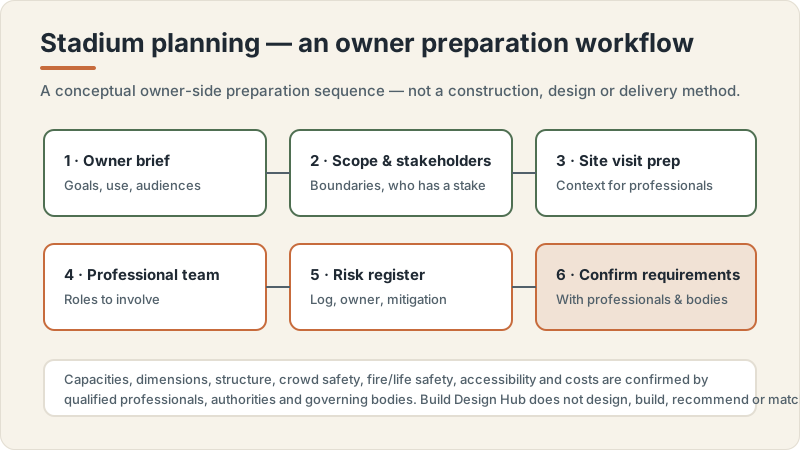
Stadium planning workflow concept
Conceptual editorial diagram — not a construction drawing, specification, to-scale plan or proof of a real project. It is not engineering, structural, fire/life-safety, crowd-safety or accessibility-compliance guidance. Capacities, dimensions, standards, requirements and costs vary by facility type, audience, site, use case and governing body, and are confirmed with qualified professionals, relevant authorities and governing bodies. Build Design Hub does not design, build, inspect, certify, recommend or match anyone.
What this guide helps you prepare
This guide helps you prepare an owner's risk register as a preparation and communication artefact: a single place where you and your team record the things that could affect a stadium project, before you sit down with qualified professionals. It walks through a plain likelihood-by-impact way of thinking, the categories of risk that owners commonly want visibility of, and the columns that keep the register readable and actionable. The aim is to arrive at professional conversations with organised questions rather than a blank page, so specialists can focus their expertise where it matters.
It does not tell you which risks to accept, how to treat any risk, or how to engineer, sequence, or make safe any part of a stadium. Those are decisions for qualified professionals, the relevant authorities, and applicable governing bodies. This guide also avoids stating any numbers, thresholds, capacities, or standards as facts, because those vary by location, facility type, use case, governing body, owner, site, authority, professional team, and project scope. Use it to structure your thinking and your record, then confirm everything with the appropriate experts.
- A shared understanding of what a risk register is for on your project and who maintains it.
- A consistent way to describe each risk so entries are comparable and not just a list of worries.
- A starting set of risk categories to prompt discussion, not a finished or authoritative list.
- A column structure that captures ownership, review timing, and status without implying decisions are made.
- A set of questions to bring to qualified professionals about how they expect risk to be tracked.
- Clarity that the register is a preparation tool, not a substitute for professional risk management.
A likelihood-by-impact way of thinking
A common owner-friendly way to think about each risk is to consider two separate questions: how likely does the team feel this is to happen, and how significant would the effect be if it did. Keeping these two dimensions separate helps stop a register from collapsing into a single vague sense of worry. Some items feel unlikely but would be very significant if they occurred; others feel more probable but comparatively minor. Recording your team's view on both, in plain descriptive bands rather than invented precise figures, gives you a way to talk about relative attention across many entries. This is a thinking aid for prioritising conversations, not a scoring system that decides anything.
Treat any likelihood or impact banding as your team's provisional judgement for discussion, always open to revision by qualified professionals who understand the specifics. Avoid presenting a matrix position as a fact or a decision, and avoid using it to conclude that a risk is safe, acceptable, or handled. The value is in the conversation it prompts: why did we place this item here, what would change our view, and who should we ask. When you meet specialists, ask how they would characterise likelihood and impact for your context and be ready to update your register accordingly.
- How would you describe, in plain words, how likely your team currently feels each risk is?
- How would you describe the significance to the project if the risk did occur, separate from likelihood?
- Which items feel low-likelihood but high-significance, and therefore deserve a professional's view early?
- What information would change your team's sense of likelihood or impact for a given entry?
- How will you avoid treating a matrix position as a decision rather than a prompt for expert input?
- Who confirms whether your provisional banding is reasonable for your specific facility and site?
Categories of risk worth logging
Owners often find it easier to surface risks by walking through categories rather than brainstorming a flat list. Typical categories to prompt discussion include site and ground conditions, planning and approvals, stakeholder and community factors, design coordination, procurement and supplier arrangements, delivery and interface risks, operations and handover, and lifecycle and maintenance considerations. Using categories helps you notice gaps, for example realising you have logged many design items but nothing about handover. The categories below are prompts to spark thinking with your team, not an authoritative or complete taxonomy, and the right set for your project should be shaped with your professional advisers.
For each category, the useful owner discipline is to phrase entries as specific, observable uncertainties rather than generic labels. An entry like a named coordination dependency between two workstreams is more useful in conversation than simply writing coordination. Resist the temptation to record any category as inherently risky or safe, and never note code, permit, capacity, or standards outcomes as settled. Instead, capture what your team is unsure about and flag it as a question for the relevant professionals and authorities, who will confirm what actually applies to your location, facility type, and scope.
- Site and ground uncertainties your team wants a qualified professional to examine, phrased as questions.
- Planning, approvals, and governing-body matters to confirm with the relevant authorities rather than assume.
- Stakeholder, neighbour, and community factors that could affect the project and its timeline.
- Procurement, supplier, and contractor interface uncertainties to explore during research and quote comparison.
- Operations, handover, and records items so downstream risks are visible early, not only at completion.
- Lifecycle and maintenance considerations the future facility manager would want logged from the start.
Planning questions before speaking with professionals
Before you engage qualified professionals, it helps to settle how your register will work so their input lands somewhere structured. Decide who owns the register, how often it is reviewed, what a good entry looks like, and how you will keep it current rather than letting it freeze after the first workshop. Agreeing this internally means the register is a working tool your team already understands, and it makes professional review more efficient because specialists can react to organised entries instead of reconstructing your thinking from scratch.
Also clarify what the register is not for, so expectations stay realistic. It is not the place where risks are accepted, treated, or declared safe, and it is not a substitute for the professional risk management, engineering, or safety work that qualified specialists perform. Framing it as a preparation and communication artefact keeps everyone honest about its limits. Bring your provisional entries and your open questions to the professionals, and expect the register to change as their expertise is applied to your specific context, authority, and scope.
- Who in your organisation will own and maintain the register, and who can update entries?
- How often will the register be reviewed, and what triggers an out-of-cycle review?
- What does a well-written entry look like for your team, so entries stay comparable and specific?
- Which categories are you uncertain you have covered, and where do you feel your list is thin?
- How will you record that an item needs a professional's view without implying it is resolved?
- What internal record-keeping keeps the register current through delivery, handover, and into operations?
Questions for qualified professionals
When you meet qualified professionals, use your draft register to drive a focused conversation. Ask how they would structure risk tracking for a project like yours, whether your categories and entries make sense, and what they would add, split, or reframe. Ask them to help you understand which items warrant early attention and why, and how they would want the register to feed into their own processes. Because they carry the relevant expertise and responsibility, treat their input as the authority on how risk is actually characterised, tracked, and acted on for your facility, site, authority, and scope.
Keep your questions open and confirm rather than assume. Do not ask this guide, or any general resource, to tell you requirements, capacities, dimensions, loads, thresholds, costs, or timelines, because those depend on specifics only your professional team and the relevant authorities can determine. Instead, ask professionals what applies, how they would verify it, and how the register should reflect their findings. The goal is a register that supports informed conversations and decisions made by the right people, not one that pretends to hold answers it cannot.
- How would you structure and maintain a risk register for a stadium project of this type and scope?
- Which of our draft entries would you reword, split, combine, or remove, and why?
- Which risks would you want examined earliest, and what information do you need from us to advise?
- How should our likelihood-by-impact framing be adjusted so it reflects your professional judgement?
- How do you want the register to connect to your own risk, coordination, and review processes?
- What should we confirm with the relevant authorities or governing bodies rather than record as settled?
What this does not replace
This is an educational planning resource only. It is not a stadium construction manual and not structural, architectural, seating or stand engineering, crowd-safety, crowd-flow, evacuation, fire or life-safety, or accessibility-compliance advice, and it is not permit, zoning, inspection, certification, legal, tax, insurance or procurement advice. It does not design, build, engineer, specify, certify, inspect or approve anything, gives no capacities, dimensions, loads, revenue, ROI or costs, and offers no warranty interpretation or estimate. Requirements, standards, capacities and costs vary by location, facility type, use case, governing body, owner, site, authority, professional team and project scope, and are confirmed with qualified professionals, relevant authorities and governing bodies.
Build Design Hub does not design, build, engineer, inspect, certify, recommend, rank, verify, introduce, broker or match suppliers, contractors, consultants or professionals, and HELPERG LLC is publisher/operator only. Use this resource to prepare your own thinking and briefs, then have qualified professionals you engage directly review your project. Decisions about design, engineering, structure, crowd safety, fire and life safety, accessibility, compliance, capacity, procurement and cost must rest on those professionals, the relevant authorities and the governing bodies for your sport and location.
- Not a stadium construction manual and not structural, architectural or seating/stand engineering
- Not crowd-safety, crowd-flow, evacuation, fire/life-safety or accessibility-compliance advice
- Not permit/zoning, inspection, certification, warranty-interpretation, legal, tax, insurance or procurement advice
- Not a supplier, contractor, consultant or professional recommendation, ranking, directory or matching service
- Not an estimate and gives no capacity, dimension, revenue, ROI or cost figures — requirements and costs vary
- Qualified professional review is required before any stadium project decision
Owner's stadium risk register preparation worksheet
- 1Record the purpose of your register in one sentence and who will own and maintain it.
- 2Gather your project brief, scope notes, and stakeholder list so entries can reference real project detail.
- 3List the risk categories you intend to use as discussion prompts, and note which feel incomplete.
- 4For each entry, write a specific, observable uncertainty rather than a generic one-word label.
- 5Note your team's provisional likelihood view for each entry in plain descriptive words, not invented figures.
- 6Note your team's provisional impact view for each entry separately from likelihood.
- 7Record the risk owner column: who on your side is watching each entry.
- 8Add a mitigation-ideas column framed as questions for professionals, not as decisions or instructions.
- 9Add a review column capturing when each entry will next be revisited and what could trigger an early review.
- 10Add a status column that shows whether an item is open, under professional review, or superseded.
- 11Flag every requirement, capacity, threshold, cost, or timeline item as to be confirmed with professionals or authorities.
- 12Note which entries need input from the relevant authorities or governing bodies.
- 13Prepare your list of questions to bring to qualified professionals about how they track risk.
- 14Record how the register will be kept current through delivery, handover, and into operations.
Common mistakes to avoid
- Treating a matrix position as a decision or a conclusion that a risk is safe or acceptable, rather than a prompt for professional input.
- Writing vague one-word entries like coordination or weather that cannot be discussed or acted on meaningfully.
- Inventing precise likelihood percentages or impact scores that imply a certainty the team does not actually have.
- Recording requirements, capacities, dimensions, loads, costs, or timelines as settled facts instead of items to confirm with professionals.
- Assuming planning, approvals, or governing-body outcomes rather than confirming them with the relevant authorities.
- Building the register once and never reviewing it, so it freezes and stops reflecting the live project.
- Leaving the owner column blank so no one is actually watching an entry between reviews.
- Using the register as a substitute for professional risk management, engineering, or safety work rather than as a preparation and conversation tool.
When to involve a professional
- When you are unsure whether your risk categories and entries are appropriate for your facility type, site, and scope.
- When any entry touches structural, seating, crowd, fire, life-safety, or accessibility matters that require qualified specialists and authorities.
- When you need to understand which risks warrant early attention and how they should be characterised for your context.
- When planning, approvals, code, permit, or governing-body questions arise that only the relevant authorities can confirm.
- When you are moving from a draft owner's register into the professional risk, coordination, and delivery processes that specialists run.
- When any decision about treating, accepting, or acting on a risk needs to be made, since those decisions belong with qualified professionals.
Frequently asked questions
Questions readers ask about this topic
Does Build Design Hub design, build, engineer, inspect, certify, or recommend suppliers and contractors for my stadium?
No. Build Design Hub is an educational publisher operated by HELPERG LLC. It does not design, build, engineer, inspect, certify, or assess safety, and it does not recommend, rank, verify, introduce, broker, or match suppliers, contractors, or professionals. It also provides no capacities, dimensions, loads, costs, timelines, or requirements. This guide is a preparation aid to help you organise a risk register and your questions; all decisions and technical work belong with qualified professionals and the relevant authorities.
Can this guide tell me how likely a risk is or which risks I should accept?
No. The likelihood-by-impact framing here is only a way to structure your own team's provisional thinking so conversations are organised. It does not tell you actual probabilities and it does not decide which risks are acceptable, safe, or handled. Those judgements depend on your specific facility, site, authority, and scope and should be confirmed with qualified professionals and applicable governing bodies.
Is a risk register the same as risk management or a safety assessment?
No. An owner's risk register, as described here, is a preparation and communication artefact for tracking uncertainties and questions. It is not professional risk management, engineering, or any form of safety, crowd, fire, or accessibility assessment. Use it to prepare for and support the work qualified professionals perform, not to replace it.
How often should I review my risk register?
There is no fixed answer, because appropriate review timing varies by location, facility type, use case, governing body, owner, site, authority, professional team, and project scope. What this guide suggests is that you decide on a review rhythm and out-of-cycle triggers internally, then confirm with your professional team how they expect the register to be maintained through delivery, handover, and operations.
Keep reading